Home / Help & Docs / Store credit and punch cards
Store credit and punch cards
Selling punch cards and packages (and the Stored Value admin) are KeepsYa
Pro features. Store credit itself, and spending any balance a family
already has, work in the free plugin.
← Check-in day · Next: Referrals →
These features all do the same basic thing: they let money or sessions carry
forward so a family can use them on a future event. This page covers store credit
and punch cards; referral rewards and packages are part of the same family and are
covered alongside.
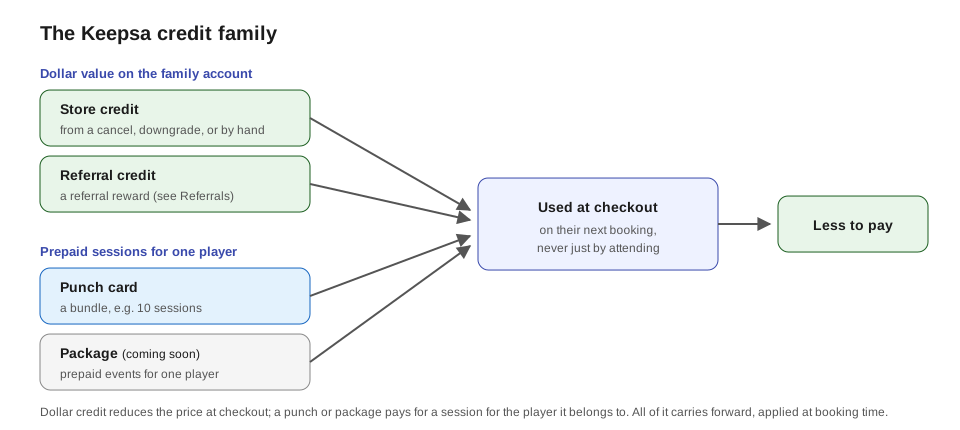
The KeepsYa credit family
There are four ways value carries forward to a future booking, in two kinds:
- Dollar value on the family account (reduces the price at checkout):
- Store credit – from a cancellation, a downgrade, or issued by hand. Covered on this page.
- Referral credit – a reward for referring a new family. See Referrals.
- Prepaid sessions for one player (pays for that player’s booking):
- Punch cards – a bundle like “10 sessions”. Covered on this page.
- Packages – a prepaid bundle of specific events for one player, much like a punch card. See Packages below.
Whatever the source, it is spent the same way: at checkout, when the family books
their next event, never just by showing up.
The simple idea: money can wait on the account
Instead of always refunding cash, KeepsYa can hold value on a family’s account
to use later. That value comes in two flavors:
- Real-money credit (cash-backed): money the family actually paid. It
never expires, and you can pay it back out as cash if they ask. - Bonus credit (promotional): value you gave them as a gift or reward. It can
expire (you set how long), and it can be spent but not cashed out.
Both kinds are spent the same way: at checkout, when they book their next
event. Credit is never used up just by showing up to an event.
Store credit (account credit)
How a family gets credit:
– They cancel a paid booking before the deadline (becomes real-money credit).
See Cancellations.
– They change to a cheaper booking before the deadline (credit for the
difference).
– You give it to them by hand from KeepsYa → Stored Value (you
choose real-money or bonus).
– They earn a referral reward (bonus credit) – see Referrals.
How a family spends credit (referral rewards included):
– They must be logged in (credit lives on their account).
– When they book a new event, checkout shows “Apply my account credit ($X
available)”, ticked by default. Leaving it ticked subtracts their balance from the
price.
– If the credit covers the whole price, the booking is Confirmed right away with
nothing left to pay. If it covers only part, it reduces the total and they pay the rest
by your normal methods.
– Credit is applied at booking time, never just by attending an event. A family can
check their balance any time on their account page
([keepsya_account module="balance"]).
Where you manage it:
– KeepsYa → Stored Value shows every account’s balance, lets you
issue credit, and lets you refund real-money credit as cash.
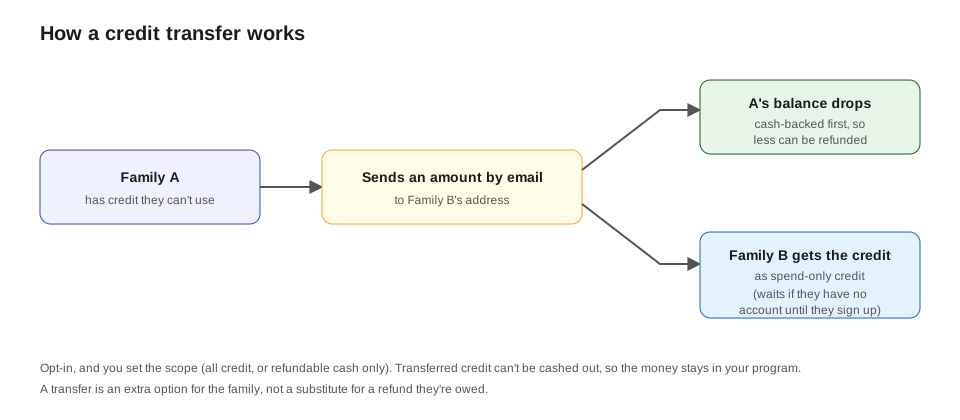
Transferring credit (optional). If you turn on Allow credit transfers (on the
Stored Value settings), a family who can’t use their
credit (moving, a player quitting) can send it to another family by email from their
account page, instead of you refunding cash. You choose whether they can transfer all of
their credit or only the cash-backed (refundable) portion. The sender’s refundable balance
is drawn down first, and the recipient receives it as spend-only credit (it can’t be cashed
out). If the recipient doesn’t have an account yet, the credit waits until they create one
with that email. A transfer is an extra option for the family, not a substitute for a refund
they’re owed.
If a transfer goes wrong. On the Stored Value page you’ll
see a list of recent transfers with a Reverse button. Reversing returns the credit to the
sender in its original form (refundable cash comes back as refundable cash), minus anything the
recipient already used. And if the recipient never creates an account to claim it, the transfer
auto-returns to the sender after the number of days you set (default 30, 0 = off), so a mistyped
email fixes itself.
Which credit is spent first. When a family spends credit, you decide the order on the
Stored Value settings: promotional first (the default, protects their refundable cash by
using expirable bonus credit first) or cash-backed first (uses their refundable money
sooner, so less can be refunded later).
Punch cards
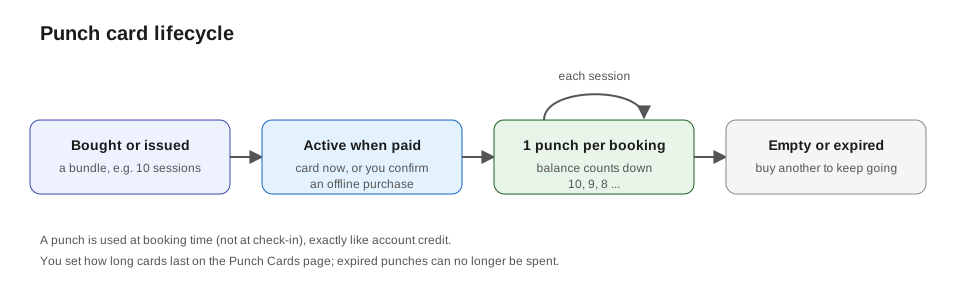
A punch card is a prepaid bundle for one child, like “10 sessions”. Each time
the child books a session, one punch is used to pay for it.
- Buying: you can give a punch card to a player from KeepsYa → Punch Cards, or a family can buy one on your site if you add the
[keepsya_punch_card]page. If they pay offline, you confirm the purchase on that screen. - Using: when the family books a session for that child, the booking can be paid with a punch from their card. (Just like credit, the punch is used at booking time, not at check-in.)
- Expiry: set how long punch cards last right on the Punch Cards page.
Packages
A package is a prepaid bundle of events for one player, much like a punch card but
tied to the specific events or event types you choose. It’s the fourth member of the
credit family.
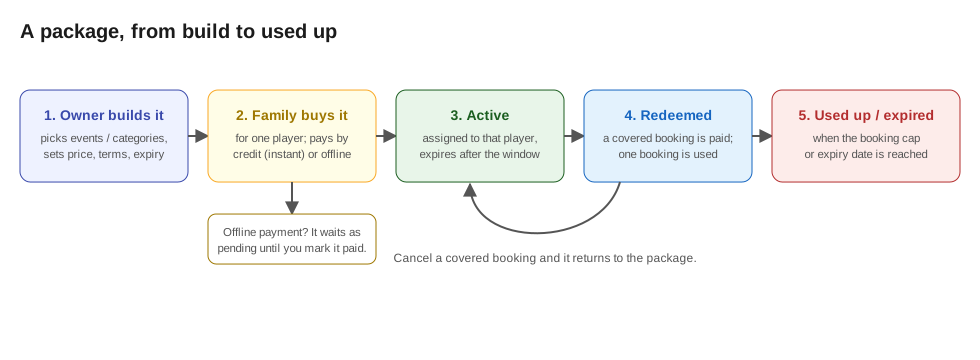
You build it on the Packages page (KeepsYa →
Packages): give it a name and total price, pick which events and/or event
categories it covers, optionally cap the number of bookings, set an expiry, and write
the terms the family agrees to at checkout. You can also issue a package to a
player by hand.
A family buys it with the [keepsya_package] shortcode (put it on a page): they pick
an active package and one of their players, and pay by account credit (it activates
right away) or an offline method (it’s held as pending until you mark it paid on
the Packages page). The price and your terms are shown before they buy.
It’s used automatically. When that player books a covered session, the package pays
for it (nothing else is charged) and one booking is used, until the cap or expiry is
reached. If a covered booking is cancelled, the booking is returned to the package so
the player keeps it.
Like the rest of the credit family, a package is assigned to a single player, and the
credit it represents is a discounted prepaid entitlement rather than refundable cash, so
disclosing the terms at purchase matters.
How this connects to your terms
Because money can stay on the account as credit, it is a good idea for your
written terms to say plainly that funds received may be applied toward future
events. That sets the right expectation: in many cases a cancellation gives
credit for a future session rather than cash back. (See the note about terms
in Cancellations.)
Next: Referrals →