Home / Help & Docs / The booking lifecycle
The booking lifecycle
← Deep-dive index · Next: Taking and recording payments →
Every sign-up moves through a few simple stages. This page explains each one so
you always know what a person’s status means.
The big picture
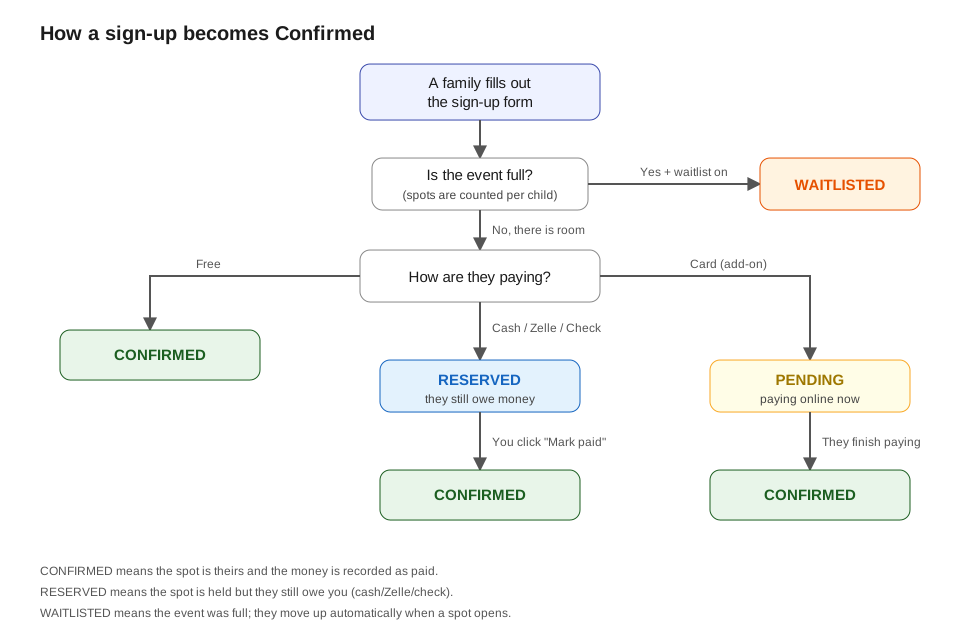
If the picture does not load, here is the same thing in words:
A family fills out the sign-up form
            |
   Is the event full?
       |
   No, room          Yes (+ waitlist on)
       |
 How are they paying?      WAITLISTED
       |
   ------------------------------------------
   |                  |                      |
  Free          Cash/Zelle/Check          Card
   |                  |                      |
CONFIRMED         RESERVED                PENDING
                 (still owes)          (paying online)
                      |                      |
              you click "Mark paid"   they finish paying
                      |                      |
                  CONFIRMED              CONFIRMED
The five statuses, in plain words
You will see these words on the roster and in emails:
- Confirmed – The spot is theirs and the money is recorded as paid. All
done. - Reserved – The spot is held, but they still owe you money. This is what
you see when someone chooses cash, Zelle, or check. It becomes Confirmed when
you mark the payment received. - Pending – They are paying by card right now. It becomes Confirmed the
moment the card payment goes through. (Card payments need the KeepsYa Payments
add-on.) - Waitlisted – The event was full, so they are waiting in line. They move
up automatically when a spot opens. - Cancellation requested – The family asked to cancel and is waiting on your
decision. The spot stays held (it still counts) until you choose credit,
forfeit, or refund. - Cancelled – The sign-up was cancelled and the spot was released.
What decides the status
When someone signs up, KeepsYa checks two things, in order:
- Is there room? Spots are counted per child, not per family. If a mom
signs up two kids, that uses two spots. If the event is full:
– If you turned on the waitlist, the sign-up becomes Waitlisted.
– If you did not, the form simply says the event is full and they cannot sign
up. - How are they paying?
– Free event (price is 0): instantly Confirmed.
– Cash, Zelle, or check: Reserved until you mark it paid.
– Card: Pending until the card goes through, then Confirmed.
What the family sees and gets
- After they sign up, they land on a confirmation screen.
- They also get an email:
- A “reserved” email if they owe money (it includes your payment
instructions, like “Bring $50 cash to the first session”). - A “confirmed” email when they are paid and set.
- A “waitlist” email if they are waiting, with their spot in line.
- You (the owner) get an email too, so you know someone signed up.
What you do next
- For cash / Zelle / check (Reserved): collect the money, then mark it paid.
See Taking and recording payments. - For card (Pending or Confirmed): nothing – the card handles itself.
- For Waitlisted: nothing unless a spot opens, then KeepsYa moves people up.
See Spots and waitlists.