Home / Help & Docs / Referrals
Referrals
← Store credit and punch cards · Deep-dive index
Referrals reward your existing families for bringing in new ones. Turn the program on in
Settings → Referrals (it is on by
default). Every family then gets a unique referral code and a share link on their
account page ([keepsya_account] → Referral).
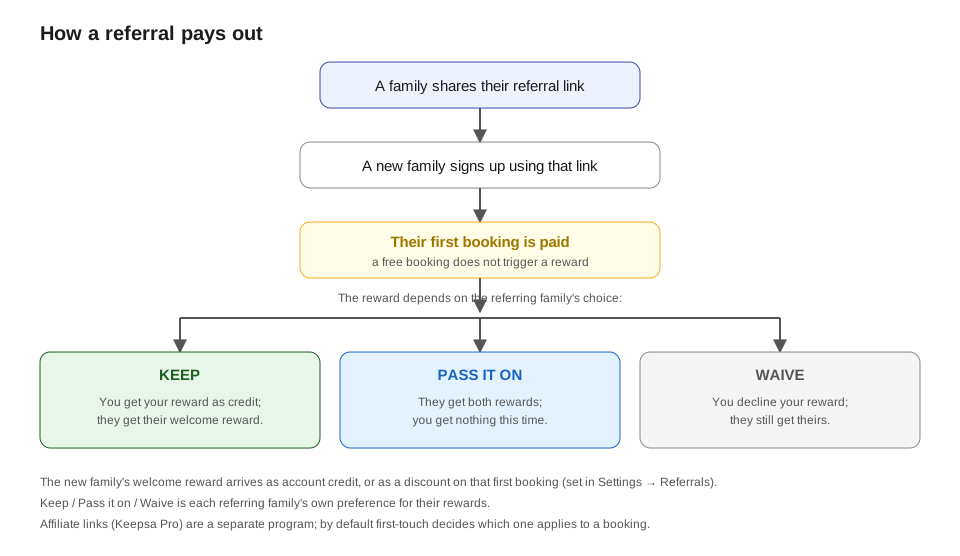
The payout chain, step by step:
- A family shares their link, e.g.
yoursite.com/?ref=THEIRCODE. Any page works, the
code is remembered in the visitor’s browser for 30 days. - A new family follows it and creates an account with the code. The referral is
recorded as pending when they confirm their email or when their first booking is
paid, whichever happens first (so a family who pays before confirming still counts). - When that new family’s first booking is actually paid, both rewards are issued at
once: the referring family gets their reward (bonus credit), and the new family
gets a welcome bonus if you set one. - The referral is marked credited and never pays out again.
When exactly is the credit given? At the moment the new family’s first booking is
paid, not when the event happens (not before and not after). So:
- Paid by card: the instant the payment goes through.
- Paid offline (cash / check / Venmo / Zelle): when you mark it paid on the
Bookings & Revenue or
roster screen. - A free ($0) booking does not trigger a reward (this prevents farming).
- The reward fires once per referred family, on their first paid booking only.
When can the reward be used, and how? Right away, the moment it is issued. It lands as
bonus credit on each family’s account, and they spend it exactly like any other account
credit (see Store credit): logged in, tick “Apply
my account credit” at checkout. Because it is bonus credit it can be spent on events but
not cashed out, and it expires after the window you set (on the
Stored Value page, default 12 months).
You set both amounts (the referrer reward and the optional new-family welcome bonus) in
Settings → Referrals, and you can see
all referral activity on the Stored Value page.
Reward amounts can be a flat $ or a percentage. Each reward (referrer and new family)
is either a flat dollar amount or a percent of the referred family’s first paid
booking. Set the type next to each amount in
Settings → Referrals. A single event can
also override the rewards: in the event editor, under Referral rewards (this event),
set a different amount and type, or leave it blank to use the global setting.
When exactly is the amount decided? At payout (the first paid booking), so a percent is
always calculated from that real booking total, and a per-event override on the event they
booked is what applies.
Credit later, or a discount now. New-family reward delivery (in
Settings → Referrals) lets you choose how
the referred family receives their reward:
- Account credit after their first paid booking (default): they pay full price, then
the credit lands on their account for a future booking. - Discount on their first booking: the reward comes straight off their first booking
at checkout, so they pay less up front. If their referrer has pass-along on, both rewards
combine into that one discount. The discount can’t exceed the booking price, and it’s
reserved so it can only be used on one booking (it frees up again if that booking is
cancelled). This works on single-event, package, and training-schedule checkout.
Owner heads-up. Your new-booking email shows a Referral line when the booking came
from a referred family: who referred them, the code, and the reward (issued, or “pays out
when paid”).
Letting families choose what happens to their reward (keep / pass / waive)
If you turn on Allow pass-along / waive (in
Settings → Referrals), each family gets a
choice in their account under Refer a friend, When a family you refer makes their
first booking, your reward:
- Give it to me as account credit (the default). The referrer keeps their reward,
exactly as if pass-along were off. - Pass it to the family I refer. The family they refer receives both rewards
(their own welcome bonus plus the referrer’s reward) and the referrer receives nothing. - Waive it. The referrer’s reward is forfeited entirely, nobody receives it (the
family they refer still gets their own welcome bonus, if you offer one). A simple way
for a family to opt out of earning credit.
The choice is read live at payout: whatever it’s set to when the reward fires is what’s
used, and it applies to both delivery modes (credit-later and discount-now). Leave Allow
pass-along / waive off and every referrer simply keeps their own reward (option 1).
The new family is told about the gift. When a referrer passes their reward along, the
new family gets a friendly “A gift from [referrer]” email naming the referrer and the
extra amount they received (either as account credit or off your first booking,
depending on your delivery setting). It’s an editable template,
KeepsYa → Emails → Referral bonus, like every other
KeepsYa email. (Families who weren’t given a passed-along reward don’t get this email.)
Helping families share
Two optional, built-in nudges (both in
Settings → Referrals):
- Promo in emails (on by default): every family-facing email gets a small footer with
that family’s own invite link and a one-line explanation of the reward. Owner/admin
notifications don’t get it. - Share-kit page: put the
[keepsya_referral_kit]shortcode on a page (e.g./share).
Logged-in families see their invite link plus ready-to-send messages (an
email/message version and a short text/social version) with one-tap Copy buttons.
Set that page’s URL in Settings so the email footer links straight to it. - The pre-event reminder invites for you. The automatic reminder KeepsYa sends a few
days before an event (see Settings → Reminders)
includes an “Invite a friend” block: the family’s referral link to that event
(unless it’s sold out) and a ready-to-paste message naming their players, your
business, the date, and the new-family discount. The reminder also lists a few other
upcoming sessions the family isn’t signed up for, a gentle cross-sell.
There is also a dedicated, auto-created Referral Program page on your site (the
[keepsya_referral_program] shortcode) that explains the program to families and shows each
logged-in family their own link plus upcoming sessions to share.
If you also run the affiliate program (KeepsYa Pro)
Family referrals and affiliate links are separate programs. If a booking somehow
carries both, KeepsYa uses first-touch by default: whichever link the customer
clicked first wins that booking, so you never pay two givers or grant two
discounts. You can let both apply at once by switching to Stack under
Affiliates → Program settings. See The affiliate program.